About the d.ecs license server
Prerequisites
The license server is a Windows service with the file name dlicsvc.exe. The service manager displays it under the name d.ecs license server. This service uses the UDP port 3489 and the TCP port 3489. You can only access the service remotely via HTTPS using port 3589.
The service is typically installed automatically, but can also be installed or removed manually:
dlicsvc -install
dlicsvc -uninstall
The d.ecs license server is configured via the tab Configuration on the page of the d.ecs license server.
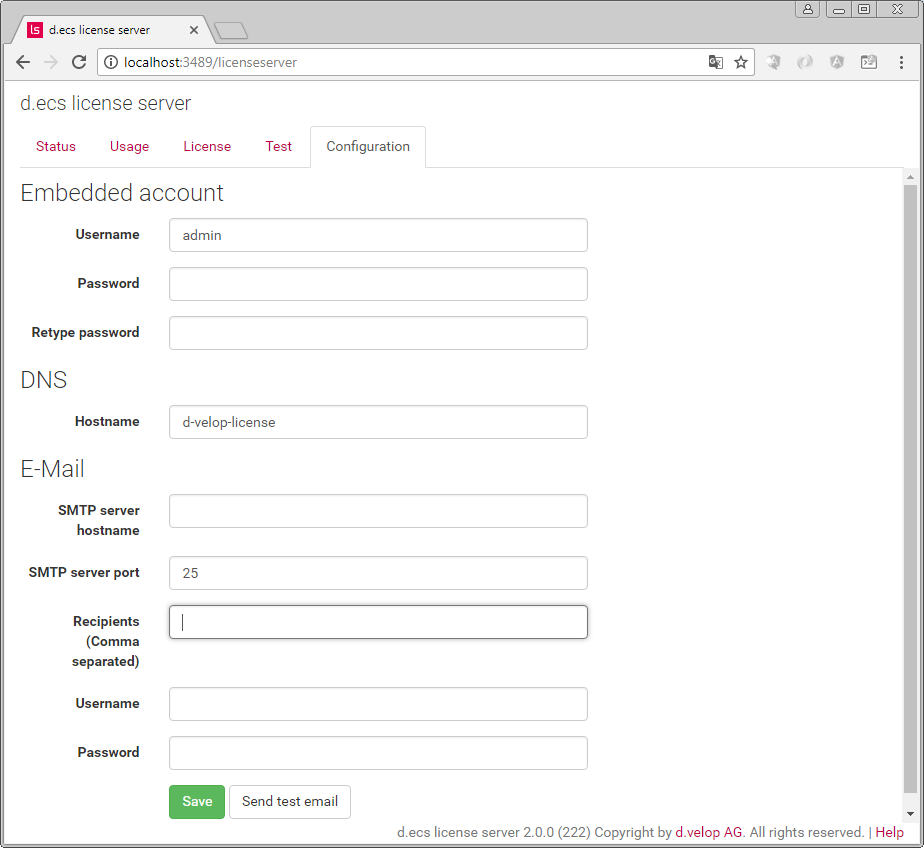 |
First select an Embedded account there. This user name and the password are then required each time you access the site directly via remote login.
If possible, use ANSI-characters for the user name and the password since the encoding is undefined for an HTTP-login and not all browsers use UTF-8.
Under DNS you can change the host name of the d.ces license server. As you will typically have only one d.ecs license server, you should keep the name d-velop-license. By default, the clients search the license server under the hostname d-velop-license. This should contain all IP-addresses where an activated license server is running. If you are operating multiple d.3 servers (e.g. test and productive), then your concurrent user licenses are centrally counted.
The hostname d-velop-license must be entered in your DNS server. We do not recommend to use a different host name. However, if you want to use another host name for the operation of the d.ecs license server, then you must adjust or create the file liccheck.ini. For this effect the liccheck.ini must be located in the same directory as the file liccheck.dll.
liccheck.ini-file
[Server]
Hostname=d3server
If no liccheck.ini file is found in the directory where the file liccheck.dll is located, the host name for the d.ecs license server is always assumed as d-velop-license.
Under E-mail, you can specify an SMTP server and one or more e-mail addresses to which the d.ecs license server sends a notification, if the licenses run low or before they expire.
Having configured all settings, click Save to save them and to restart the d.ecs license server.
After the restart, you can test the e-mail configuration with a click on Send test email and send a test e-mail to the specified recipient.
If the d.ecs license server is executed on a server, where the remaining d.ecs infrastructure is installed, you can also access the user interface of the d.ecs license server via d.3one under the tile Configuration or via the d.ecs monitor. The currently logged in user must be an administrator for this effect.